
Your photo library. Your server.
Most photo apps store your library on a server you don’t own, under terms you didn’t negotiate. ReMuse Photos takes a different approach: every photo and video you manage with the app lives on your own Nextcloud server. We never see your photos. We can’t. We don’t have access to your server.
Your library is organized exactly the way it is on your Nextcloud — the same folders, the same albums, the same files. Open them in your Nextcloud web interface, copy them to your desktop, back them up however you like. They’re yours.
Browse and organize
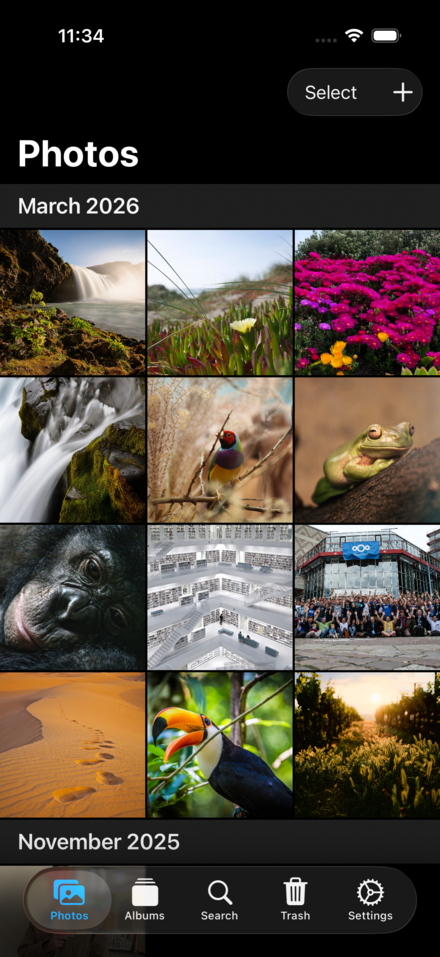
ReMuse Photos shows your photo library as a scrollable timeline ordered by the date each photo was taken, using EXIF metadata to get the date right even for older photos imported from elsewhere. Photos load quickly with a two-level thumbnail cache — fast in memory, persistent on disk.
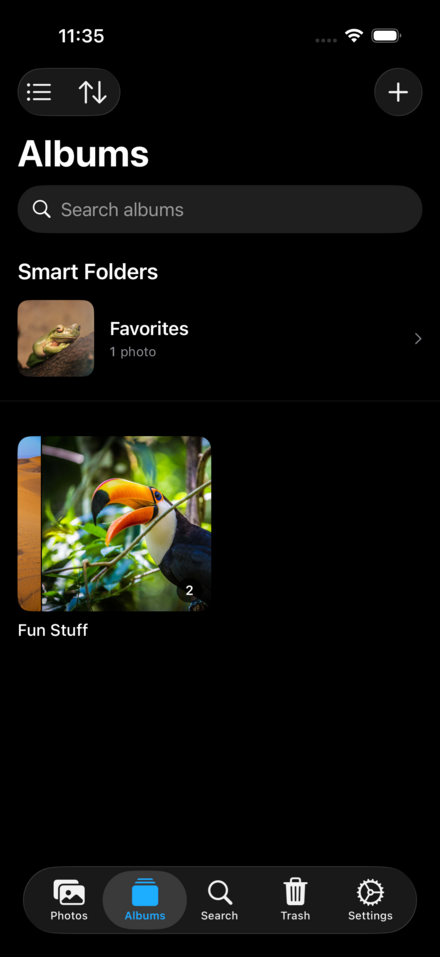
Create albums, add photos to them, and manage your library from your phone. Smart albums for Favorites, Screenshots, Videos, and Recently Added are always up to date. Search by date range, file size, or type. Mark favorites with a tap and find them instantly later.
When you have multiple photos to manage, multi-select mode lets you batch-move, batch-download, or batch-delete. Large operations show live progress in a Lock Screen activity so you can put your phone away while uploads finish.
Upload from anywhere
Tap to upload photos from your iPhone’s camera roll. Share directly from any app using the iOS share sheet. The upload queue is backed by SwiftData and survives app termination — if you close the app mid-upload, it picks up exactly where it left off when you reopen it.
Video is fully supported. Large video files stream during upload to avoid memory exhaustion. The timeline shows video badges and plays video directly in the detail view.
Biometric lock
ReMuse Photos supports Face ID and Touch ID to lock the app at rest. Your Nextcloud credentials are stored in the system Keychain and never visible to the app after initial login. The app uses Nextcloud’s Login Flow v2 — a secure browser-based authentication — so your real password never enters the app.
Privacy first
There are no third-party SDKs, no analytics libraries, and no advertising frameworks anywhere in the ReMuse Photos binary. Every line of code — including the WebDAV sync implementation — was written by us. The app collects no usage data, no crash logs, and no analytics of any kind.
Your photos stay on your server. That’s not a feature. That’s the point.
Features
- Photo and video timeline ordered by EXIF capture date
- Two-level thumbnail caching for fast browsing
- Albums — create, organize, and manage from your device
- Smart albums: Favorites, Screenshots, Videos, Recently Added
- Multi-select with batch move, download, and delete
- Metadata search — date range, file type, file size
- Duplicate detection using perceptual hashing
- Basic photo editing — rotate, crop, brightness, contrast, saturation
- Persistent upload queue backed by SwiftData — survives app termination
- Live Activity for upload progress
- Video support with streaming upload and in-app playback
- Nextcloud Login Flow v2 — real password never enters the app
- Biometric lock with Face ID and Touch ID
- Share sheet integration — upload from any app
- No telemetry, no analytics, no third-party code