Write the way you think
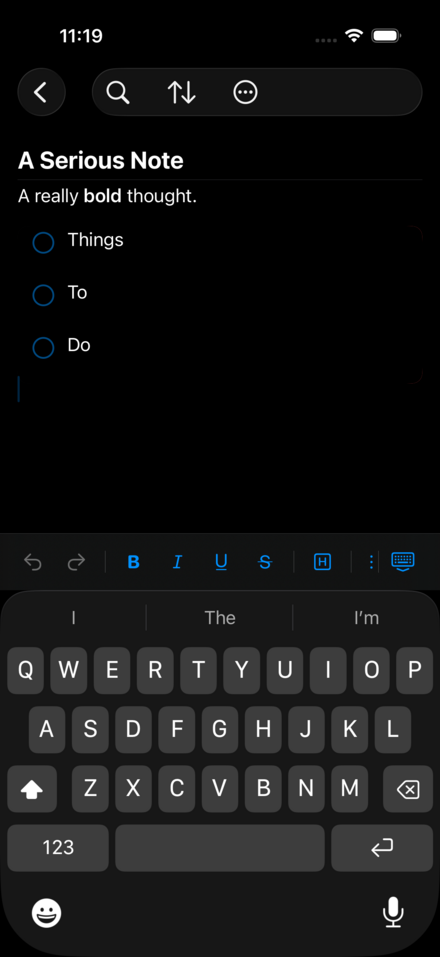
A great note-taking app should get out of the way and let you write. ReMuse Notebook does exactly that — with a clean, focused editor that reveals a full formatting toolbar the moment your keyboard appears.
Bold a heading. Italicize a thought. Strike through a task you’ve abandoned. Adjust the font size for emphasis. Align a pull quote to the center. Every formatting action is a single tap, and the toolbar disappears the moment you put the keyboard away.
When an idea calls for a list, toggle Bullet Mode and press Return to keep adding items. When words aren’t enough, attach up to ten photos directly to your note. When you need to revisit the same note again and again, pin it. ReMuse gets out of your way so you can think.
Organized the way you want
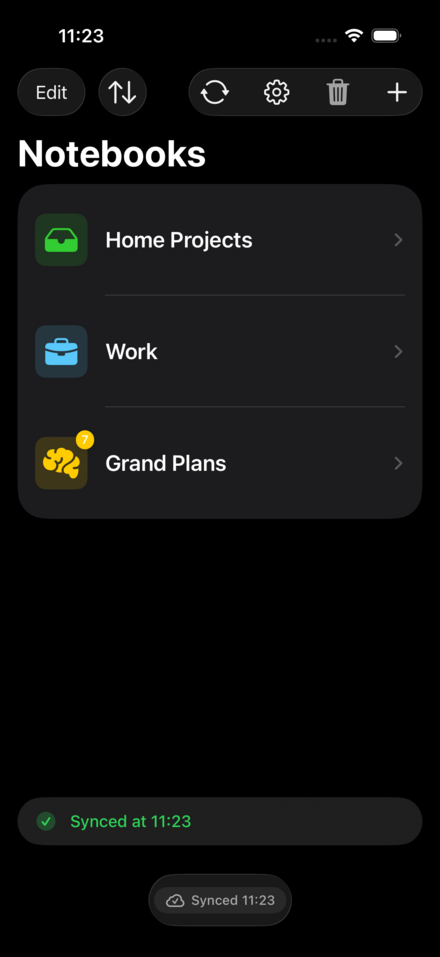
Notes live inside Notebooks — color-coded, icon-adorned collections you can tailor to match every corner of your life. Choose from over 45 icons and 16 accent colors. Name them whatever you like, pin the ones you reach for most, and sort everything by title, date, or your own custom order.
Search cuts across every notebook at once, surfacing matching notebooks and individual notes in a single results view. Whether you have five notebooks or fifty, finding what you need is never more than a few keystrokes away.
Sync without compromise
Most note apps sync through someone else’s cloud. ReMuse Notebook syncs through yours. Connect it to your Nextcloud server and your notes travel between devices as plain Markdown files — readable by any text editor, fully under your control, never locked away in a proprietary format.
Sync runs automatically a few seconds after you stop typing, when you switch apps, and on demand whenever you pull down to refresh. If the same note is edited on two devices at the same time, ReMuse doesn’t silently overwrite one version. It shows you both versions side by side and lets you choose — or resolve all conflicts in bulk with a single tap.
Open by design
Your notes on the server are standard Markdown files with YAML frontmatter. Open them in iA Writer, Obsidian, VS Code, or your Nextcloud web interface. Edit them on your desktop and sync the changes back to your phone. Import existing .md and .txt files from your device. Export individual notes or entire notebooks as Markdown or plain text, complete with attached images.
ReMuse Notebook is part of your workflow, not a replacement for it.
Privacy first
ReMuse Notebook contains no advertising, no analytics, and no third-party cloud accounts. Your credentials and your notes never leave your device and your server. That’s a promise baked into the design, not a premium upgrade.
Your Nextcloud credentials are stored in the system Keychain. The app supports Face ID and Touch ID for an additional layer of privacy. There are no third-party SDKs, no analytics libraries, and no advertising frameworks in the app — every line of code, including the WebDAV and Markdown implementations, was written by us.
Features
- Rich text editor with bold, italic, underline, strikethrough, font size, and alignment
- Bullet mode with automatic continuation
- Interactive checklists — tap to check off, swipe to delete
- Hyperlink insertion with custom display text
- Date and time stamps inserted at cursor
- Photo attachments — up to 10 images per note
- Undo and redo
- Notebooks with custom icons and accent colors
- Pinned notebooks always float to the top
- Flexible sorting — title, date created, date modified, or manual drag order
- Global search across all notebooks and notes simultaneously
- Nextcloud sync via WebDAV — bidirectional, automatic, and conflict-aware
- Conflict resolution — side-by-side comparison with one-tap decisions
- Import Markdown and plain text files from your device
- Export notes or entire notebooks as Markdown or plain text
- No telemetry, no analytics, no third-party code